

Legal work is increasingly document-driven. There are contracts to review, due diligence reports to deliver, drafts to write, case law to check. The volume keeps growing, deadlines keep shrinking, and much of a senior lawyer's time is still consumed by tasks that could be accelerated with technology — without losing control and without sacrificing technical quality.
Lopti was designed for exactly this. Not as a generic AI adapted to law, but as a legal platform built around the real workflow. It has four integrated modules: Document Management, Conversations, Extractor, and Draft. Each covers a stage of document-driven work, and together they form a single flow that runs from the raw file to the final version of the contract.
From the raw file to the final version
Lopti's four modules were designed to talk to each other. You can use one on its own or all of them in sequence, depending on what the task requires. Everything starts in Document Management, where you organize the case files. Conversations come before drafting, for research and analysis. The Extractor steps in when the work involves volume. Draft is where the AI writes alongside you, closing the loop with the final version of the contract.
Get to know each of the tools
Document Management: everything about the case and everything you produce
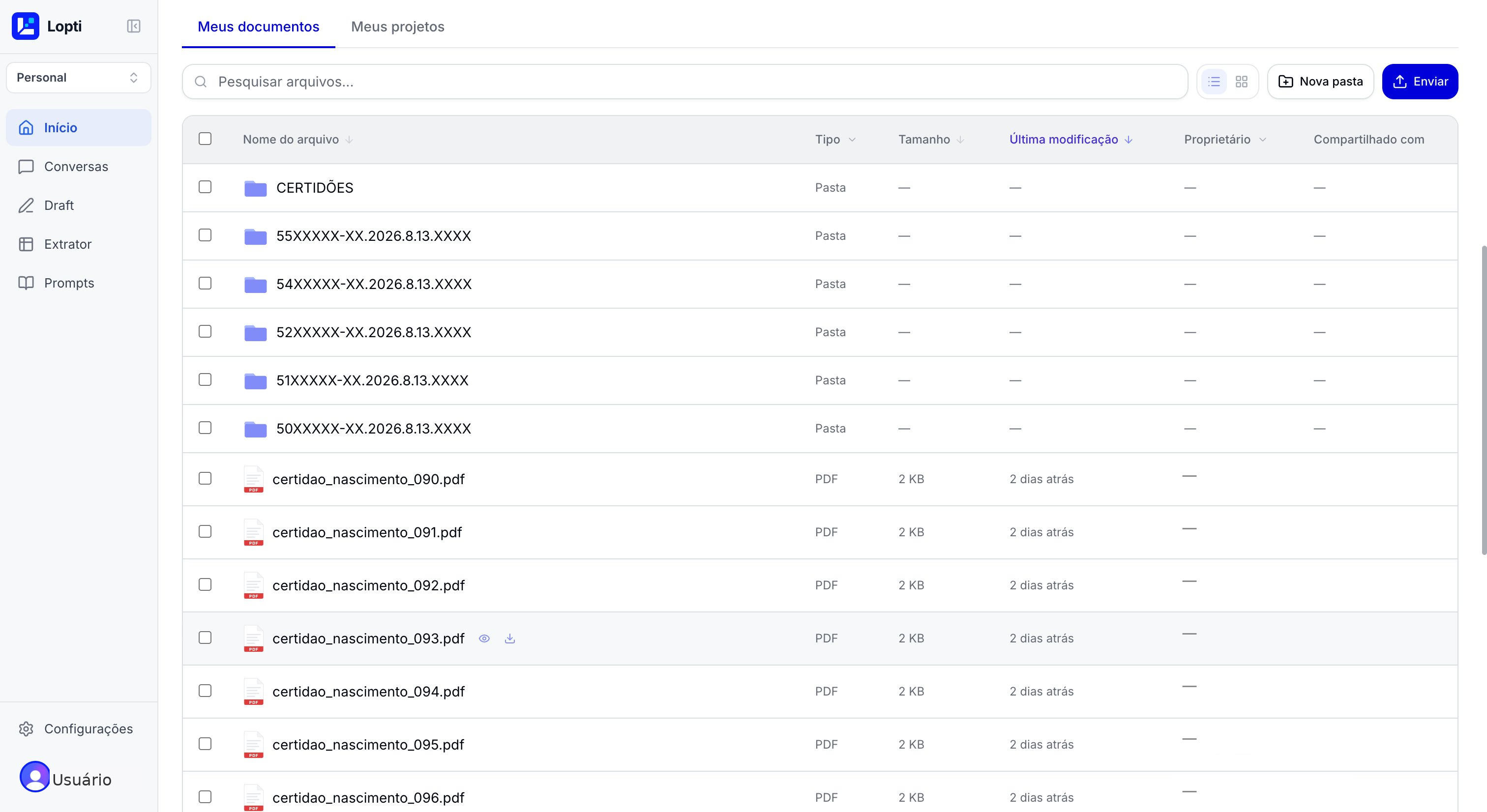
Document Management is where everything begins and where everything is saved. It is the platform's central repository, split into two tabs that cover two sides of legal work: the files that come in and the work you produce inside Lopti.
In "My documents," you organize the case files. You upload PDFs, DOCX, and other formats, create folders by client or matter, search by name, and view everything as a list or a grid. Each file carries information about its type, size, last modification, owner, and who it is shared with.
In "My projects," you access everything you have already produced on the platform, organized by type: Conversations, Drafts, Extractor tables, and saved Prompts. It is the memory of your work inside Lopti, always accessible so you can pick up an analysis, reuse a draft, or revisit an earlier extraction.
- ●My documents: case files in folders and projects
- ●My projects: history of Conversations, Drafts, Extractor, and Prompts
- ●Fast search and sharing across the team
Conversations: research before you draft
The Conversations module is the starting point for technical work. It lets you research legislation and case law, analyze specific documents, translate technical texts, and build the background you need before drafting a brief or a contract. Unlike a general-purpose AI, it comes with built-in legal tools: CNJ lookups, searches across legislation and binding precedents, a prompt library, and ready-made workflows.
You attach a contract or an initial brief as context, choose from the available AI models (fast, balanced, thorough, advanced), and use the action bar to bring sources straight into the prompt: hearing audio transcription, legislation search, case lookups on the CNJ, legal translation.
- ●Attach a PDF, DOCX, or TXT as context
- ●AI models ranging from fast to thorough
- ●CNJ lookups, transcription, legal translation
Extractor: documents become a smart table
When the work involves volume, reading one document at a time is unworkable. You might have 30 contracts in a due diligence, 50 rulings to map, or 200 powers of attorney to check. The Extractor turns that batch into a queryable format: each document becomes a row, each of your questions becomes a column, and the AI fills every cell with the answer extracted from the original document.
The result is a spreadsheet ready for analysis, with filters, sorting, and a citation to the source excerpt in each cell for auditing. It is the ideal tool for due diligence, batch analysis, comparative review, and organizing large volumes of documents.
- ●Upload 50 PDFs at once, in parallel
- ●Questions in natural language
- ●Audit trail with a source excerpt per cell
Draft: write without copying and pasting
Draft is the module where Lopti sets itself apart most clearly from any other legal AI. Here, you don't ask for a text and paste it into Word. The AI applies the change directly in the document, preserving the original formatting (justified alignment, indents, a/b/c lists, non-consecutive numbering).
Each change becomes a side card with the author, the type (insertion, deletion, replacement), and a one-sentence summary. You move through the cards, review what was done, and can undo specific changes. This is different from a traditional Ctrl+Z, which would wipe out all the work that came after.
- ●The AI applies changes directly in the document
- ●Side cards with author and type of change
- ●Surgical undo of a specific change
The labor claim arrived on Friday. The defense went out on Monday.
An in-house legal team receives, late on a Friday afternoon, a labor claim with ten demands: overtime, moral damages, equal pay, hazardous-duty premium. The complaint runs 40 pages, the time records span two years, and the deadline to respond starts running on the next business day. See how Lopti follows this flow, from the first file opened to a defense ready to file.
Step 1
Documents
Complaint, time records and pay stubs
Step 2
Conversations
TST case law
Step 3
Extractor
Demands and amounts in a table
Step 4
Draft
Defense drafted
Ready to see Lopti applied to your routine?
In a 20-minute demo, we show the platform running on a case close to your own reality.